Setting up the RT4-5GP/4 server connection: APN, IP address, backup server and errors
For alarms from the RT4-5GP/4 to reach the monitoring centre and the Defendex app, the transmitter must work in OnLine mode — over 4G/2G via the internet. How to set the APN, server address and backup server, including by SMS, and what the GPRS error and OnLine error messages mean.
How the transmitter keeps the link
- After power-up the transmitter connects to the main server. A domain name can be used instead of the main server IP address; the backup and duplicate servers take an IP address only.
- If the main server is unavailable or the link drops, the transmitter switches to the backup server. It works there for a while (1 hour by default) and then tries to return to the main server.
- The duplicate server receives copies of messages: the transmitter connects to it only while sending.
- If a message is unsent when the link drops, it goes by SMS to user 1; once the SMS is sent successfully, the message is not repeated over IP.
- If no main server IP address is set (or it is 0.0.0.0) and no DNS server is set, the transmitter works in OffLine mode — SMS only.
What to set
| Setting | SMS command | What it is |
|---|---|---|
| APN | 99.A followed by the access point name | Operator access point for data |
| Main server | 99.I followed by the IP address | Receiving server address |
| Main server port | 99.P followed by the port | Receiving server TCP port |
| Backup server | 99.II followed by the IP address | Where to connect if the main server is unavailable |
| Backup server port | 99.PP followed by the port | Backup server TCP port |
| Domain name | 99.DD followed by the name | Instead of the main server IP; a DNS server is set with it |
| DNS server | 99.DI followed by the IP address | Needed when a domain name is used |
| Online ID | 99.W followed by the ID | Up to 15 characters; the SIM number without country code is convenient |
All settings can also be made in USB_Reader when programming the transmitter. The duplicate server cannot be set by SMS — only with USB_Reader or TLF_Serv. The transmitter confirms each command with “Module config. changed”.
Setting up by SMS, step by step
- Register the master phone: 91. followed by its number (for example, 91.+37122334455). All commands below are sent from this phone.
- Set the APN: 99.A followed by your operator’s access point name.
- Set the server: 99.I followed by the IP address, then 99.P followed by the port. If the server is given as a domain name — 99.DD followed by the name, and 99.DI followed by the DNS server IP address.
- If needed, set the backup server: 99.II followed by the IP address, 99.PP followed by the port.
- If the operator requires a login and password for data: 99.Y1 followed by the login, 99.Y2 followed by the password (up to 8 characters each).
- Send 87.1234 — the command to connect to the server (1234 is the default security code).
To switch from a domain name back to an IP address, simply clear the DNS server with 99.DI without an address. The operator login and password are cleared with 99.Y1 and 99.Y2 without a value.
Reconnection intervals
| Command | What it sets |
|---|---|
| 99.M followed by minutes | Time between attempts to restore the server link (up to 255) |
| 99.R followed by minutes | Time between attempts to return from the backup to the main server |
| 99.O followed by seconds | How often the transmitter polls the server (15 to 255 seconds) |
| 99.T followed by a number | Test message period in tens of minutes (up to 255) |
Errors and what to do
| Message | Code | What to check |
|---|---|---|
| GPRS error | E854001 | Could not connect to the data service: the APN and whether the service is enabled by the operator |
| OnLine 1 error | E854002 | No link to the main server: IP address, port, router and firewall settings on the server side |
| OnLine 2 error | E854004 | The same for the backup server |
| OnLine 3 error | E854005 | The same for the duplicate server |
| Check bat or power | E804000 | Battery low: the transmitter left OnLine mode to save power |
Leaving OnLine mode on a low battery is on by default and can be turned off in USB_Reader. Below 8 V the transmitter stops sending messages altogether to avoid losing data and resumes at 11.5 V.
Checking
- SMS 99.C1 — the transmitter replies with its firmware version and the addresses and ports of all three servers: compare them with the monitoring centre settings.
- SMS 99.C4 — the Online field should show ON and the server number, for example ON/IP1 — connected to the main server.
- SMS 99.C3 — signal level CSQ (15–20 acceptable, 20–30 good) and CGREG 1,1 — the data service is available.
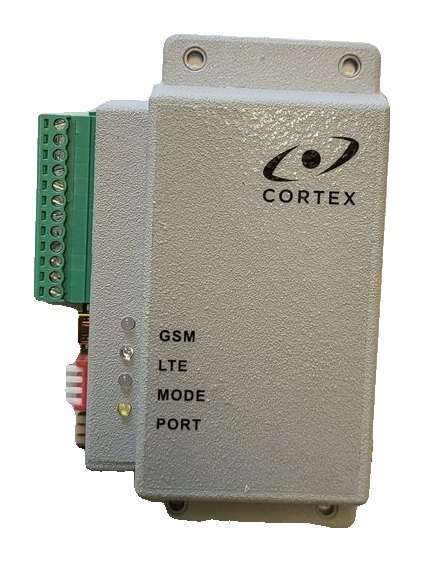
- The GSM LED is lit and flashes every 3 seconds — OnLine mode.
Documentation
Learn more
This guide is based on the CORTEX manual. If you have questions, call technical support: +371 26485444 (24/7).