RT4-5GP/4 alarms in the Defendex app: how to connect a site
The site owner receives alarms from the RT4-5GP/4 transmitter as push notifications in the Defendex app, sees the alarm status and arms the site from a phone. How this works, what the installer does and where SMS fits in.
How it works
- The alarm panel (Paradox, DSC, CADDX NX) passes events to the RT4-5GP/4.
- In OnLine mode the transmitter sends them over 4G/2G to the receiving server in Contact ID format.
- The Defendex 2.0 platform receives the event and decodes the Contact ID into plain text.
- The owner immediately gets a push notification in the Defendex app — and, if wanted, the same in the Telegram bot.
What the owner sees in the app
- Push notifications about alarms, arming, disarming and warnings.
- A list of their sites with the current status: armed, disarmed, alarm.
- One-tap arming and disarming of each partition — up to 5 partitions; the panel type is taken into account automatically.
- Event history with filters by date and type.
- An interface in Latvian, Russian and English.
The owner app is on Google Play; an iOS version is in preparation. An additional notification channel is the Defendex Telegram bot.
What the installer does
- Connects the RT4-5GP/4 to the panel and selects the mode — see the guides on connecting to Paradox and to DSC/CADDX NX.
- Programs the transmitter for OnLine operation: receiving server IP address and TCP port, operator APN. The Online ID field can be left empty — the transmitter then stores the modem IMEI there.
- In the Defendex Installer app taps “+ Device” and enters the transmitter IMEI (15 digits), the site number and a name.
- Selects the GSM/LTE channel and receiving server, the device type, panel type and number of partitions, and saves.
- Turns on “Add owner” and enters a login: a new login needs a password, an existing login is simply linked to the site.
- The owner signs in to the Defendex app with their login — the site is already in the list.
The Defendex Installer app for installers is provided on request. If the site number or IMEI is already taken, registration is rejected with the reason.
Where SMS fits in
On the RT4-5GP/4, SMS is a secondary, backup channel:
- If the IP link to the server drops while a message is being sent, the transmitter sends the unsent message by SMS to user 1.
- Besides the main server you can set a backup server: if the link is lost, the transmitter switches to it and periodically tries to return to the main one.
- SMS is handy for checking the transmitter (commands 99.C1–99.C4) and setting it up without a computer.
Checking
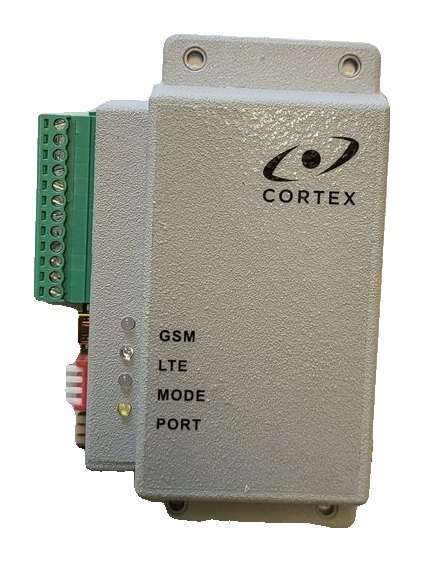
- The GSM LED is lit and flashes every 3 seconds — the transmitter is in OnLine mode; LTE lit blue — 4G network.
- In the app the site is shown as Online.
- Trigger an alarm on the panel: a push notification and an entry in the event history should appear in the app straight away.
Documentation
Learn more
This guide is based on the CORTEX manual. If you have questions, call technical support: +371 26485444 (24/7).